> ## Documentation Index
> Fetch the complete documentation index at: https://docs-dev-chore-actions-triggers-autoupdate.mintlify.site/llms.txt
> Use this file to discover all available pages before exploring further.

> Learn how to configure your HTTP Vault Connections to authorize HTTP requests to external APIs or services.

# HTTP Vault Connection

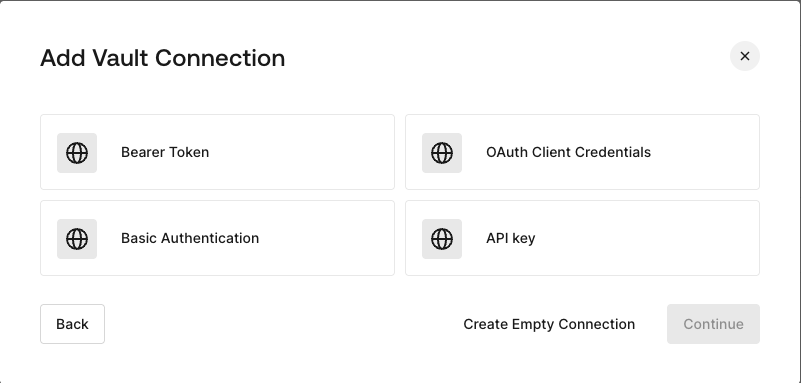
## Configure your HTTP Vault Connection Options

HTTP Vault Connection can be configure with different authentication options and then be used at your HTTP Request Flow Actions.
<Frame>
  <img src="https://mintcdn.com/docs-dev-chore-actions-triggers-autoupdate/F6_aLWfReRksrE7h/docs/images/customize/forms/vaults/http-vault-connection-options.png?fit=max&auto=format&n=F6_aLWfReRksrE7h&q=85&s=cee243d1f3592c90e581f3d48992a7cf" alt="Dashboard > Actions > Forms > Vault > HTTP" data-og-width="801" width="801" data-og-height="383" height="383" data-path="docs/images/customize/forms/vaults/http-vault-connection-options.png" data-optimize="true" data-opv="3" srcset="https://mintcdn.com/docs-dev-chore-actions-triggers-autoupdate/F6_aLWfReRksrE7h/docs/images/customize/forms/vaults/http-vault-connection-options.png?w=280&fit=max&auto=format&n=F6_aLWfReRksrE7h&q=85&s=755887de92a60229fe9f4d53f9b049a2 280w, https://mintcdn.com/docs-dev-chore-actions-triggers-autoupdate/F6_aLWfReRksrE7h/docs/images/customize/forms/vaults/http-vault-connection-options.png?w=560&fit=max&auto=format&n=F6_aLWfReRksrE7h&q=85&s=86641466c3d9d7096c42f0012be62812 560w, https://mintcdn.com/docs-dev-chore-actions-triggers-autoupdate/F6_aLWfReRksrE7h/docs/images/customize/forms/vaults/http-vault-connection-options.png?w=840&fit=max&auto=format&n=F6_aLWfReRksrE7h&q=85&s=765435c08043deb70fe9d69c6c0a5048 840w, https://mintcdn.com/docs-dev-chore-actions-triggers-autoupdate/F6_aLWfReRksrE7h/docs/images/customize/forms/vaults/http-vault-connection-options.png?w=1100&fit=max&auto=format&n=F6_aLWfReRksrE7h&q=85&s=fdcb2d9af54430ae8a4da1fec6603575 1100w, https://mintcdn.com/docs-dev-chore-actions-triggers-autoupdate/F6_aLWfReRksrE7h/docs/images/customize/forms/vaults/http-vault-connection-options.png?w=1650&fit=max&auto=format&n=F6_aLWfReRksrE7h&q=85&s=37223a8d322ec675dbf29c90d5449f2f 1650w, https://mintcdn.com/docs-dev-chore-actions-triggers-autoupdate/F6_aLWfReRksrE7h/docs/images/customize/forms/vaults/http-vault-connection-options.png?w=2500&fit=max&auto=format&n=F6_aLWfReRksrE7h&q=85&s=85daff0beb2320d57ede3a1c4a3f4c72 2500w" />
</Frame>

## Configure your HTTP Vault Connection for Bearer Token

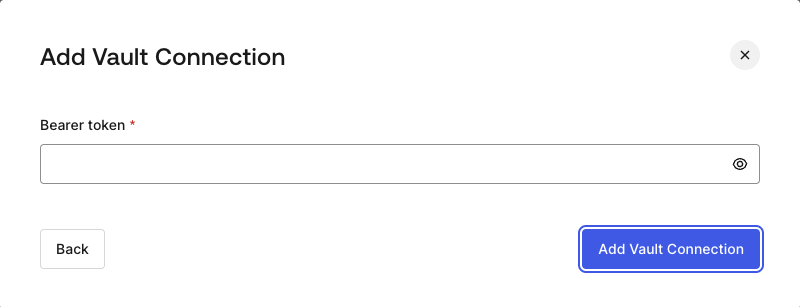
To configure a HTTP Vault Connection using **Bearer Token** authorization, you need to set the required parameters.
<Frame>
  <img src="https://mintcdn.com/docs-dev-chore-actions-triggers-autoupdate/F6_aLWfReRksrE7h/docs/images/customize/forms/vaults/http-vault-connection-bearer-token.png?fit=max&auto=format&n=F6_aLWfReRksrE7h&q=85&s=b80b491336fc25026526ac6bec43983e" alt="Dashboard > Actions > Forms > Vault > HTTP" data-og-width="800" width="800" data-og-height="307" height="307" data-path="docs/images/customize/forms/vaults/http-vault-connection-bearer-token.png" data-optimize="true" data-opv="3" srcset="https://mintcdn.com/docs-dev-chore-actions-triggers-autoupdate/F6_aLWfReRksrE7h/docs/images/customize/forms/vaults/http-vault-connection-bearer-token.png?w=280&fit=max&auto=format&n=F6_aLWfReRksrE7h&q=85&s=80e9517ea1d1483f735a339f6b6b7079 280w, https://mintcdn.com/docs-dev-chore-actions-triggers-autoupdate/F6_aLWfReRksrE7h/docs/images/customize/forms/vaults/http-vault-connection-bearer-token.png?w=560&fit=max&auto=format&n=F6_aLWfReRksrE7h&q=85&s=61147a822b7eaac879f5a135bc513059 560w, https://mintcdn.com/docs-dev-chore-actions-triggers-autoupdate/F6_aLWfReRksrE7h/docs/images/customize/forms/vaults/http-vault-connection-bearer-token.png?w=840&fit=max&auto=format&n=F6_aLWfReRksrE7h&q=85&s=ee786ee02a1d2822508893beee4ca2ab 840w, https://mintcdn.com/docs-dev-chore-actions-triggers-autoupdate/F6_aLWfReRksrE7h/docs/images/customize/forms/vaults/http-vault-connection-bearer-token.png?w=1100&fit=max&auto=format&n=F6_aLWfReRksrE7h&q=85&s=1ec0788fa0c65213f7f93f157f463b80 1100w, https://mintcdn.com/docs-dev-chore-actions-triggers-autoupdate/F6_aLWfReRksrE7h/docs/images/customize/forms/vaults/http-vault-connection-bearer-token.png?w=1650&fit=max&auto=format&n=F6_aLWfReRksrE7h&q=85&s=66371deaff4872353c504a5aa666d376 1650w, https://mintcdn.com/docs-dev-chore-actions-triggers-autoupdate/F6_aLWfReRksrE7h/docs/images/customize/forms/vaults/http-vault-connection-bearer-token.png?w=2500&fit=max&auto=format&n=F6_aLWfReRksrE7h&q=85&s=fa5e46c629483e02ec3eaf65ebe3b408 2500w" />
</Frame>

### Input settings

| Parameter    | Description                                           |
| ------------ | ----------------------------------------------------- |
| Bearer Token | Static token used for external service authorization. |

## Configure your HTTP Vault Connection for OAuth Client Credentials

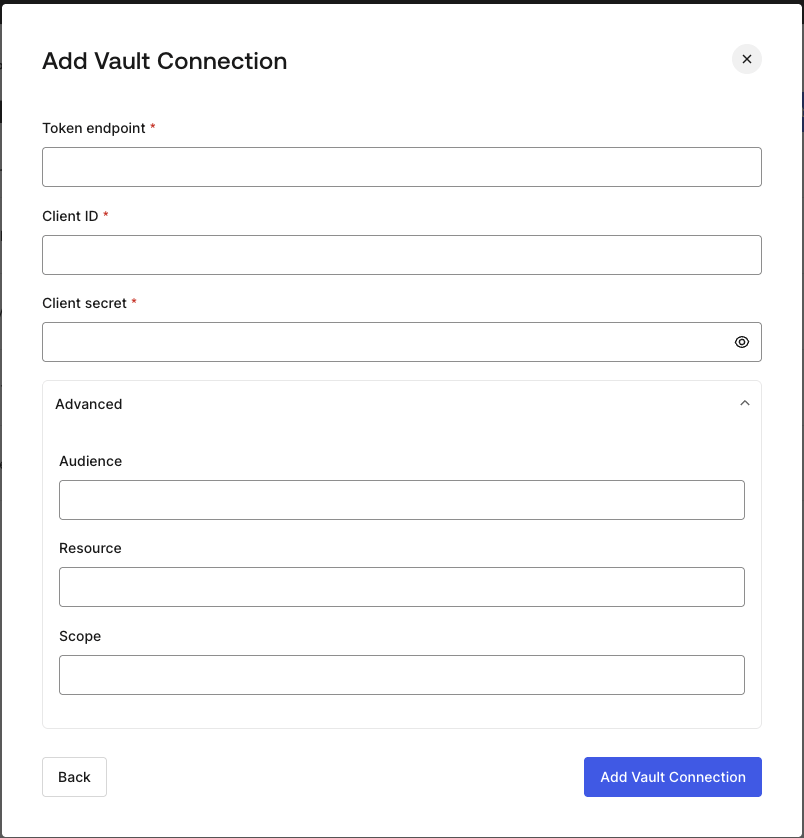
To configure a HTTP Vault Connection using **Client Credentials** authorization, you need to set the required parameters.
<Frame>
  <img src="https://mintcdn.com/docs-dev-chore-actions-triggers-autoupdate/F6_aLWfReRksrE7h/docs/images/customize/forms/vaults/http-vault-connection-oauth-client-credentials.png?fit=max&auto=format&n=F6_aLWfReRksrE7h&q=85&s=f14a432ff59337304ce8e9e5957a07a4" alt="Dashboard > Actions > Forms > Vault > HTTP " data-og-width="804" width="804" data-og-height="838" height="838" data-path="docs/images/customize/forms/vaults/http-vault-connection-oauth-client-credentials.png" data-optimize="true" data-opv="3" srcset="https://mintcdn.com/docs-dev-chore-actions-triggers-autoupdate/F6_aLWfReRksrE7h/docs/images/customize/forms/vaults/http-vault-connection-oauth-client-credentials.png?w=280&fit=max&auto=format&n=F6_aLWfReRksrE7h&q=85&s=f10dbd1c8e94528dd38f17ee682838fe 280w, https://mintcdn.com/docs-dev-chore-actions-triggers-autoupdate/F6_aLWfReRksrE7h/docs/images/customize/forms/vaults/http-vault-connection-oauth-client-credentials.png?w=560&fit=max&auto=format&n=F6_aLWfReRksrE7h&q=85&s=2c4704dc95472b16fa2336f5b89e55b6 560w, https://mintcdn.com/docs-dev-chore-actions-triggers-autoupdate/F6_aLWfReRksrE7h/docs/images/customize/forms/vaults/http-vault-connection-oauth-client-credentials.png?w=840&fit=max&auto=format&n=F6_aLWfReRksrE7h&q=85&s=09ec093e061f02ebaea8cded687e53c2 840w, https://mintcdn.com/docs-dev-chore-actions-triggers-autoupdate/F6_aLWfReRksrE7h/docs/images/customize/forms/vaults/http-vault-connection-oauth-client-credentials.png?w=1100&fit=max&auto=format&n=F6_aLWfReRksrE7h&q=85&s=2c2c93d97f692a39825423ea335f67e3 1100w, https://mintcdn.com/docs-dev-chore-actions-triggers-autoupdate/F6_aLWfReRksrE7h/docs/images/customize/forms/vaults/http-vault-connection-oauth-client-credentials.png?w=1650&fit=max&auto=format&n=F6_aLWfReRksrE7h&q=85&s=fe95a283a1041263c348a1ac1a5b49bc 1650w, https://mintcdn.com/docs-dev-chore-actions-triggers-autoupdate/F6_aLWfReRksrE7h/docs/images/customize/forms/vaults/http-vault-connection-oauth-client-credentials.png?w=2500&fit=max&auto=format&n=F6_aLWfReRksrE7h&q=85&s=c4b98ffb517ad983b37fd65ed96628a5 2500w" />
</Frame>

### Input settings

| Parameter           | Description                                                               |
| ------------------- | ------------------------------------------------------------------------- |
| Tenant Endpoint     | Tenant Endpoint of the Authorization Server issuing the Access Tokens.    |
| Client ID           | Client ID of your M2M Application authorized for Custom API.              |
| Client Secret       | Client Secret of your M2M Application authorized for Custom API.          |
| Audience (Optional) | Custom API Audience. Normally used for Custom APIs defined in Auth0.      |
| Resource (Optional) | Custom API Resource. Standard parameter with similar meaning of Audience. |
| Scope (Optional)    | Scope list in string format separated by spaces.                          |

## Configure your HTTP Vault Connection for API Key

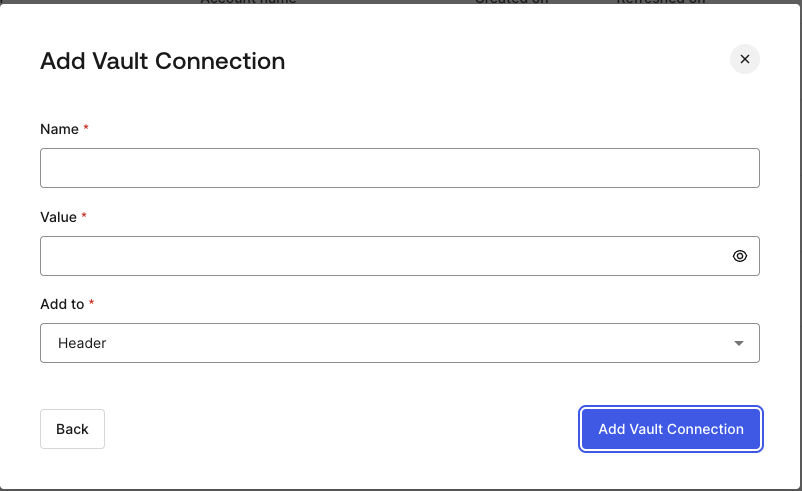
To configure a HTTP Vault Connection using **API Key** authorization, you need to set the required parameters.
<Frame>
  <img src="https://mintcdn.com/docs-dev-chore-actions-triggers-autoupdate/F6_aLWfReRksrE7h/docs/images/customize/forms/vaults/http-vault-connection-api-key.png?fit=max&auto=format&n=F6_aLWfReRksrE7h&q=85&s=5126a4ef1474b4f50a9712e7c1dfbfb7" alt="Dashboard > Actions > Forms > Vault > HTTP " data-og-width="802" width="802" data-og-height="491" height="491" data-path="docs/images/customize/forms/vaults/http-vault-connection-api-key.png" data-optimize="true" data-opv="3" srcset="https://mintcdn.com/docs-dev-chore-actions-triggers-autoupdate/F6_aLWfReRksrE7h/docs/images/customize/forms/vaults/http-vault-connection-api-key.png?w=280&fit=max&auto=format&n=F6_aLWfReRksrE7h&q=85&s=d8386cf9faa32108e2af7ebb596e0cb3 280w, https://mintcdn.com/docs-dev-chore-actions-triggers-autoupdate/F6_aLWfReRksrE7h/docs/images/customize/forms/vaults/http-vault-connection-api-key.png?w=560&fit=max&auto=format&n=F6_aLWfReRksrE7h&q=85&s=90cbc09d4f4d45740606c030388fea4a 560w, https://mintcdn.com/docs-dev-chore-actions-triggers-autoupdate/F6_aLWfReRksrE7h/docs/images/customize/forms/vaults/http-vault-connection-api-key.png?w=840&fit=max&auto=format&n=F6_aLWfReRksrE7h&q=85&s=01c4321e3a52c173a7c66d88ba506c2d 840w, https://mintcdn.com/docs-dev-chore-actions-triggers-autoupdate/F6_aLWfReRksrE7h/docs/images/customize/forms/vaults/http-vault-connection-api-key.png?w=1100&fit=max&auto=format&n=F6_aLWfReRksrE7h&q=85&s=e5fb50f9c740eb2cd035fef2c0566ce6 1100w, https://mintcdn.com/docs-dev-chore-actions-triggers-autoupdate/F6_aLWfReRksrE7h/docs/images/customize/forms/vaults/http-vault-connection-api-key.png?w=1650&fit=max&auto=format&n=F6_aLWfReRksrE7h&q=85&s=52dcf35b9a2e93387150d83d827beebc 1650w, https://mintcdn.com/docs-dev-chore-actions-triggers-autoupdate/F6_aLWfReRksrE7h/docs/images/customize/forms/vaults/http-vault-connection-api-key.png?w=2500&fit=max&auto=format&n=F6_aLWfReRksrE7h&q=85&s=ae5b466aff9eaf26a18a0b0029c90aa2 2500w" />
</Frame>

### Input settings

| Parameter | Description                                                                                  |
| --------- | -------------------------------------------------------------------------------------------- |
| Name      | API Key name to be added as Header or Query parameter.                                       |
| Value     | API Key value to be added as Header or Query parameter.                                      |
| Add To    | By default, it's Header. Determines whether to add the API Key as Header or Query parameter. |

## Configure your HTTP Vault Connection for Basic Authentication

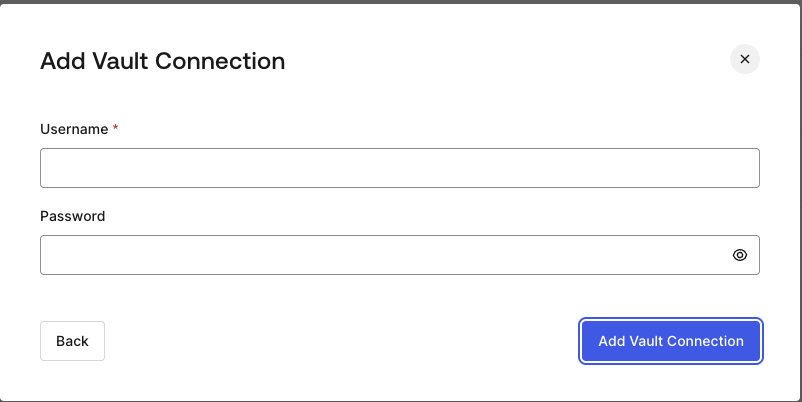
To configure a HTTP Vault Connection using **Basic Auth** authorization, you need to set the required parameters.
<Frame>
  <img src="https://mintcdn.com/docs-dev-chore-actions-triggers-autoupdate/F6_aLWfReRksrE7h/docs/images/customize/forms/vaults/http-vault-connection-basic-authentication.png?fit=max&auto=format&n=F6_aLWfReRksrE7h&q=85&s=fb1cda64a0c682f95afc6f9d5f52bdd1" alt="Dashboard > Actions > Forms > Vault > HTTP " data-og-width="802" width="802" data-og-height="402" height="402" data-path="docs/images/customize/forms/vaults/http-vault-connection-basic-authentication.png" data-optimize="true" data-opv="3" srcset="https://mintcdn.com/docs-dev-chore-actions-triggers-autoupdate/F6_aLWfReRksrE7h/docs/images/customize/forms/vaults/http-vault-connection-basic-authentication.png?w=280&fit=max&auto=format&n=F6_aLWfReRksrE7h&q=85&s=c22fc30b7b8f5229eb3f656c7d1c1473 280w, https://mintcdn.com/docs-dev-chore-actions-triggers-autoupdate/F6_aLWfReRksrE7h/docs/images/customize/forms/vaults/http-vault-connection-basic-authentication.png?w=560&fit=max&auto=format&n=F6_aLWfReRksrE7h&q=85&s=d7d6b698682596cbcd16567047acf32f 560w, https://mintcdn.com/docs-dev-chore-actions-triggers-autoupdate/F6_aLWfReRksrE7h/docs/images/customize/forms/vaults/http-vault-connection-basic-authentication.png?w=840&fit=max&auto=format&n=F6_aLWfReRksrE7h&q=85&s=2b7282aa1944fec5173acdde8243e582 840w, https://mintcdn.com/docs-dev-chore-actions-triggers-autoupdate/F6_aLWfReRksrE7h/docs/images/customize/forms/vaults/http-vault-connection-basic-authentication.png?w=1100&fit=max&auto=format&n=F6_aLWfReRksrE7h&q=85&s=18f4c827b3d1f571e1153ca030d8b390 1100w, https://mintcdn.com/docs-dev-chore-actions-triggers-autoupdate/F6_aLWfReRksrE7h/docs/images/customize/forms/vaults/http-vault-connection-basic-authentication.png?w=1650&fit=max&auto=format&n=F6_aLWfReRksrE7h&q=85&s=113e3de6031c5640bfd7093d682f8f81 1650w, https://mintcdn.com/docs-dev-chore-actions-triggers-autoupdate/F6_aLWfReRksrE7h/docs/images/customize/forms/vaults/http-vault-connection-basic-authentication.png?w=2500&fit=max&auto=format&n=F6_aLWfReRksrE7h&q=85&s=72e3c44355b1259c27951ebbe6dbf5a3 2500w" />
</Frame>

### Input settings

| Parameter | Description                                                                                         |
| --------- | --------------------------------------------------------------------------------------------------- |
| Username  | Username to be concatenated and base64 encoded, then added as Basic Authorization Header parameter. |
| Password  | Password to be concatenated and base64 encoded, then added as Basic Authorization Header parameter. |

<Warning>
  HTTP Vault Connection with Basic Auth configuration, is looking forward to replace the currently built-in option at Flows HTTP Request Action.
</Warning>
